File Solo or Hire a Tax Pro? The Hybrid Option That Wins | Tax Studio AI
Short answer: Filing solo can be cheap. Hiring a preparer can be safe. The smartest path in 2026 is hybrid: file in one hub, self-serve when it’s simple, and pull in a tax pro on demand the moment things get complex. You keep speed and judgment—without switching systems.
TL;DR: If your return is W-2-only single-state, DIY is fine. Add 1099/K-1, stock sales, rentals, or a state move? Go hybrid: self-serve intake + targeted pro review.
1) The Full Cost Picture (Cash + Time + Risk)
Cash outlay (typical ranges)
DIY software: $0–$200+ (federal + state, e-file, add-ons)
Pro-prepared return: $300–$1,500+ depending on complexity
Hybrid (self-serve + targeted review): $100–$600+ for focused help on tricky parts
Your time (the hidden driver)
Use a simple time valuation:
Time cost = Hours × Your Hourly Value.
Light DIY: 4–6h (organized W-2)
Moderate DIY: 6–10h (1099-B sales, HSA, credits)
Complex DIY: 10–20h+ (K-1, rentals, multi-state)
If you value your time at $50–$75/h, a “moderate DIY” year quietly costs $300–$750 before penalties or amendments.
Risk (where small mistakes compound)
Missed elections/credits: QBI, basis tracking, HSA/retirement windows
State sourcing: remote-work apportionment, moving mid-year
Reporting mismatches: 1099-B vs broker statements, multi-lot cost basis
Notices/amendments: time + possible interest/penalties
Hybrid takeaway: You pay a pro only where judgment changes dollars, not for uploading documents.
2) What DIY, Full-Service, and Hybrid Each Do Best
DIY excels at
Straightforward W-2 + standard deduction
Quick filing when you already know the rules
Full-service excels at
Planning + representation for complex returns
Entity elections, depreciation, multi-state strategy
Hybrid (best of both)
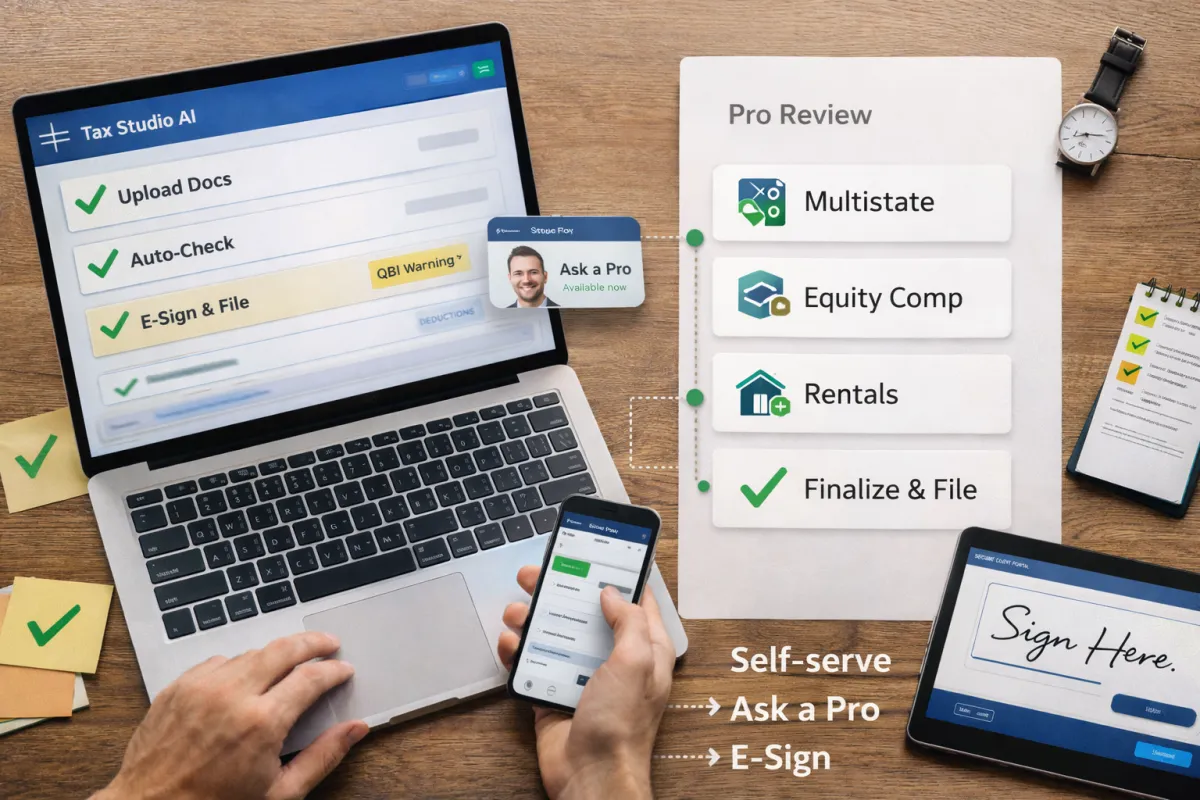
Self-serve intake in one hub (upload → auto-check → e-sign)
Pro on demand for flagged areas (equity comp, K-1s, rentals, state moves)
Zero re-entry: the same file powers both DIY speed and pro review
3) The Hybrid Workflow (How It Works in Practice)
Upload once
Drag-and-drop W-2/1099/K-1, brokerage summary, 1098, and prior return. The hub extracts data and builds a checklist automatically.Real-time checks
Gaps are flagged: missing state forms, basis inconsistencies, potential QBI issues, SALT limits, etc. You fix easy items yourself.Ask a Pro (only when needed)
With one click, route a specific item (e.g., multi-state W-2, ESPP sale, rental depreciation) to a licensed preparer. They annotate, finalize, and keep everything in the same record.E-sign & file
No email attachments. One audit trail. If a notice arrives later, your pro can respond using the same file.

4) Decision Tree (60-second self-assessment)
Answer yes/no:
Any 1099-NEC/K-1 or side business?
Sold stocks/crypto or exercised options?
Moved states or worked remotely across state lines?
Rental property, home office, or depreciation?
Prior-year carryovers (capital losses, passive, NOL)?
Unsure about QBI, SALT, or basis?
Your time is worth >$50/h?
0–2 yes: DIY is fine.
3–4 yes: Hybrid recommended.
5+ yes: Hybrid with pro-led finalization.
5) Real-World Scenarios (Before → After)
A) W-2 plus small brokerage (Do-it-yourself with guardrails)
Before: 6–8h reconciling 1099-B, unsure about lots and wash sales.
After (Hybrid): Upload 1099-B → auto-matches totals → single flag on basis lot ID → click Ask a Pro → 20-minute fix → e-sign.
B) Contractor with home office + HSA (Targeted advice)
Before: Missed SEP/HSA timing, Schedule C questions, estimated tax stress.
After: Hub suggests contribution windows and safe-harbor estimates; pro reviews home-office + vehicle method; taxpayer files confidently.
C) Multi-state move + RSUs (Pro-led finalization)
Before: Confusion on split-year residency, sourcing equity income, local taxes.
After: Self-serve intake; pro splits wages, sources RSU income, and confirms credits; filing + playbook for next year.
6) Common Mistakes That Cost People Money
Treating equity sales like W-2 income (missed basis → overstated gains).
Ignoring part-year state rules after a relocation.
Forgetting to carry forward losses/credits from last year.
Choosing the wrong depreciation method on rentals.
Emailing sensitive docs (no audit trail, harder to respond to notices).
Fix: A single hub with audit logs, secure e-sign, and pro escalation.
7) Security, Compliance, and Peace of Mind
Bank-grade encryption and granular access controls
Audit trail: who touched what and when
Centralized e-sign: no stray PDFs or inbox fishing
Continuity: if you need help later, your pro uses the exact same file
8) FAQ
Can I start DIY and escalate later?
Yes. Start self-serve; click Ask a Pro when a flag matters (multi-state, equity, rentals). No switching tools.
What happens if I get a notice after filing?
Your documents and work history live in one hub. A pro can reply using the same record.
I’m a small firm owner—does this help my team?
Absolutely. Replace a 12-app patchwork with one hub: intake, extraction, reminders, e-sign, search, audit trail. Your seniors review; juniors don’t re-enter data.
How fast is setup?
15–30 minutes to connect books (QBO/Xero), invite your team, and publish your client intake link.
Bottom Line
DIY alone: lowest cash, highest hidden cost.
Full-service alone: safest, but slow/pricey for simple years.
Hybrid (Tax Studio AI): Do it yourself, never alone. Self-serve speed with expert judgment on demand—in one place.